
Image Translator: The Complete 2026 Guide to Translating Text in Photos
Everything you need to know about how a photo translator reads and translates text in a photo, how it compares to Google and Yandex, and how to get clean, accurate results every time.
Quick answer: An image translator is a tool that scans a photo for text using optical character recognition (OCR), then runs that text through machine translation and places the translated words back on the image — or shows them as plain text you can copy. You upload a photo, choose the source and target language, and get a translated version back in seconds, with no typing required.
If you've ever stared at a restaurant menu, a product label, or a screenshot in a language you don't read, you've probably wished you could just point your camera at it and have the words appear in your own language. That's exactly what an image translator does. Instead of retyping foreign text into a translation box — which is slow and easy to get wrong with unfamiliar scripts — a picture translator reads the photo directly and hands you the translation.
This guide covers how photo translation tools actually work, how to use one correctly, how the major options compare, and how to get the most accurate results, whether you're translating a Chinese product label, a Japanese sign, or a screenshot full of English text.
Want to try it yourself? Upload a photo above and get a translated version back in under a minute.
Open the image translatorWhat Is an Image Translator and How Does It Work?
An image translator combines two separate technologies into one step. First, optical character recognition (OCR) scans the photo pixel by pixel and identifies where text sits and what each character says. Second, a machine translation engine takes that extracted text and converts it into your chosen language. Some tools stop there and just show you the translated text; more advanced ones — including the free image translator tool on this page — go a step further and redraw the translated text directly on top of the image, in roughly the same place the original text appeared.
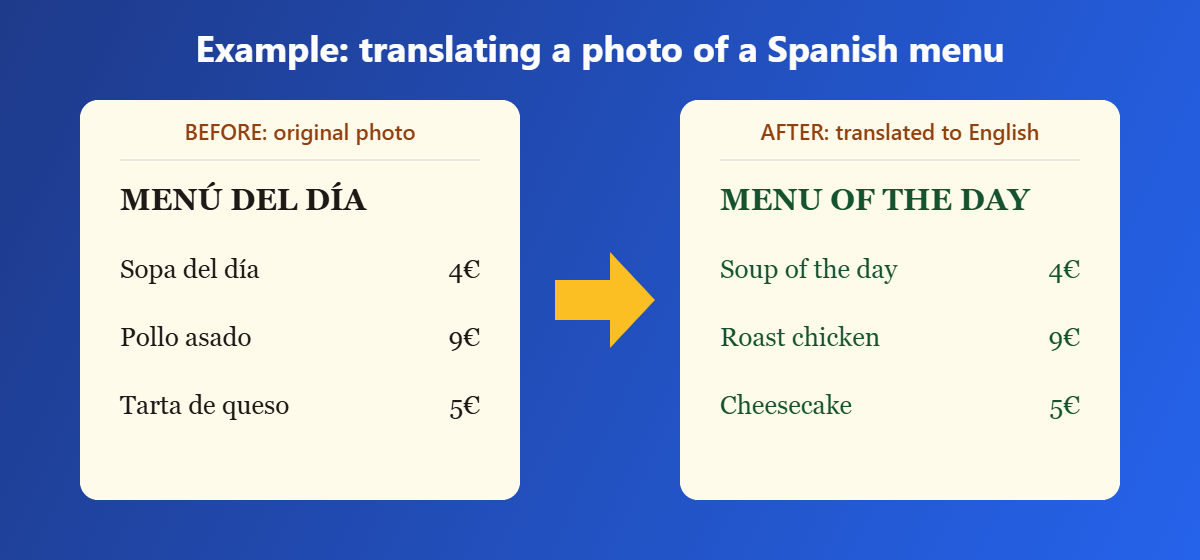
This two-step process is why image translation is sometimes called "OCR translation" or "photo translation." The accuracy of the final result depends on both halves of the pipeline: how well the OCR engine reads the characters in the photo, and how well the translation engine renders those words in natural, correct language.
Image Translator vs. Text Translator
A standard text translator, like the translation box in Google Translate, only works with text you type or paste in. An image translator (also searched as an image text translator or a translator with image input) removes that step entirely — you upload the photo, and the tool extracts and translates the text for you. This matters most when the source text uses a script you can't type easily, such as Chinese, Japanese, Arabic, or Cyrillic, or when the text is embedded in a graphic, sign, or scanned document.
How to Use an Image Translator: Step-by-Step
Translating an image online usually takes three steps, and the process on this site works the same way:
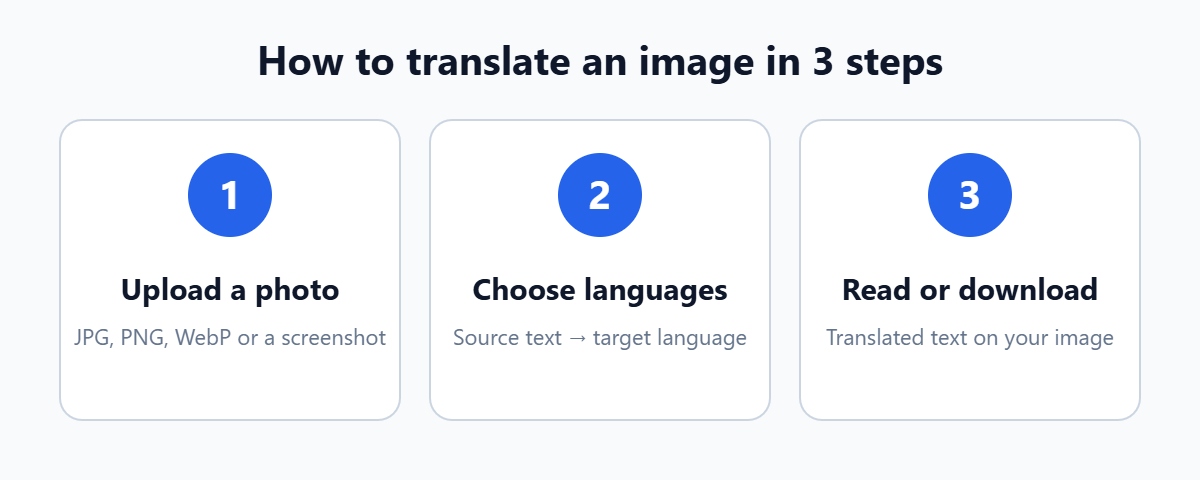
- Upload your photo. Drag and drop it, click to browse, or paste it straight from your clipboard into the image translator tool.
- Choose your languages. Select the language the text in the photo is written in, and the language you want it translated to.
- Download the result. The tool reads the text, translates each line, and places the translation back on the image so you can save it as a PNG.
For the cleanest results, use a photo where the text is in focus, reasonably well lit, and not at a sharp angle. A slightly cropped, straight-on shot of the text will almost always outperform a wide photo taken from across a room.
What's a Good Image Translator? Comparing the Main Options
If you're wondering what's a good image translator to use, it depends on what you need: a quick one-off translation, ongoing use inside an app you already have, or something that works without sending your photo to a server. Here's how the common options stack up.
| Tool | Best for | Note |
|---|---|---|
| Browser-based image translator (this tool) | Quick, private, one-off translations | Runs in your browser, no account needed |
| Google Image Translator (Google Lens) | Real-time translation through your phone camera | Built into the Google app / Google Translate app |
| Yandex image translator | Photo translation with strong Russian and Eastern European language support | Part of Yandex Translate |
| AI image translator apps | Batch translation and editing inside images | Often paid, aimed at professional/marketing use |
Google Image Translator
Google's version of a photo translator lives inside the Google Translate app and Google Lens. Point your camera at text and it overlays a translation in real time, which is convenient for quick glances but less useful when you want a saved, shareable image with the translated text already placed on it.
Yandex Image Translator
Yandex Translate offers a similar photo-translation feature, and it's a solid option if you're translating into or out of Russian or other languages with strong support in Yandex's models. Like Google's version, it's built for quick lookups rather than producing a downloadable translated image.
AI Image Translator Tools
Newer AI photo translation tools use large language models alongside OCR to handle messier text — stylized fonts, handwriting, or text that wraps around objects. They tend to be more accurate on difficult images but are more often paid products aimed at businesses translating product photos or marketing materials at scale.
Want a deeper comparison? Read Image Translator vs Google Lens, our roundup of the best image translator tools, and the best apps to translate text in photos.
Image Translator vs. Image to Text Translator: What's the Difference?
Two closely related terms often get mixed up. An image to text translator (or image text translator) typically means a tool that only extracts the text from a photo — the OCR step — without necessarily translating it into another language. A full photo translator does both: it reads the text and translates it.
If all you need is to pull editable text out of a photo, scanned page, or screenshot in the same language, an OCR-only tool is enough. If you need that text understood in a different language, you need the full translate-image-to-English (or any other target language) pipeline described above.
Translating Specific Languages With an Image Translator
Some language pairs come up more often than others, and each has its own quirks worth knowing before you upload a photo.
Chinese to English Image Translator
Chinese text — whether Simplified or Traditional characters — is one of the most common reasons people need to translate text in a photo, since typing Chinese characters without the right input method is impractical. A Chinese-to-English photo translator needs an OCR model trained specifically on Chinese script; feeding it a low-resolution or busy background photo is the most common cause of missed or garbled characters, so a clear, cropped shot works far better than a wide photo of a packed shelf or menu board. Try our Chinese to English image translator with Chinese already selected, or read our guide to translating Chinese text in images.
Japanese Image Translator
Japanese combines three scripts — kanji, hiragana, and katakana — in the same sentence, which makes OCR slightly more demanding than single-script languages. A good Japanese photo translator handles all three, but accuracy improves noticeably with higher-contrast images, such as black text on a white sign rather than text printed over a photo or patterned background. Use our Japanese to English image translator, or see how to translate manga and comic pages.
Arabic, Urdu, and Other Right-to-Left Scripts
Right-to-left languages like Arabic and Urdu add another layer of complexity, since the OCR engine has to correctly detect reading direction as well as individual characters. These scripts tend to translate most reliably from printed text rather than handwriting or stylized signage fonts. Start with our Arabic to English image translator, or read our guides to Arabic and Hindi and Urdu text in images. Translating Cyrillic? Use the Russian to English image translator.
Common Use Cases for an Image Translator
- Travel: menus, street signs, transit maps, and hotel notices in a language you don't read.
- Shopping: ingredient lists, dosage instructions, and care labels on imported products.
- Work and study: screenshots, scanned pages, and slides shared in another language.
- Social media: captions, memes, and comments posted in a language other than your own.
- Documents: forms, receipts, and letters that need a quick, rough translation before deciding whether a certified translation is needed.
For step-by-step help, see our guides to image translation for travel, business and document translation, and translating restaurant menus with your phone.
For anything official — legal contracts, medical records, immigration paperwork — treat online photo translation as a first read, not a final one, and have important documents checked by a professional human translator.
Tips for Getting Accurate Results From an Image Translator
- Shoot the photo straight-on rather than at an angle, so lines of text aren't distorted.
- Make sure the text is in focus — blur is the single biggest cause of OCR errors.
- Crop out unnecessary background so the tool isn't scanning irrelevant areas of the image.
- Use good lighting, and avoid glare or shadows falling directly across the text.
- Select the correct source language rather than relying on auto-detection for short or ambiguous text.
More detail: tips for taking photos that translate accurately.
Is It Safe to Use an Online Image Translator?
Privacy is a fair question any time you upload a photo to a website. On this site, the image reading (OCR) step happens directly in your browser rather than on a remote server, so the photo file itself isn't uploaded anywhere. Only the short lines of extracted text are sent out, to the translation service, in order to get the translation back. If you're translating anything sensitive, it's still worth checking a tool's privacy policy before uploading, since not every photo translation tool works this way. Text recognition is powered by the open-source Tesseract OCR engine.
Frequently Asked Questions
What is the best image translator?
The best image translator depends on your use case. For a quick, private, one-off translation with a downloadable result, a browser-based tool like the one on this page works well. For real-time translation while traveling, a phone-based option like Google Lens is more convenient since it doesn't require saving a photo first. Compare options in our best image translator tools guide.
Is Google Translate an image translator?
Yes — the Google Translate app includes a camera and image translation mode, often referred to as a Google image translator, that reads text from a photo or live camera feed and overlays a translation.
Can I translate an image to text for free?
Yes. Free image to text translator tools use OCR to extract text from a photo at no cost, and most, including this one, also translate that text into another language in the same step rather than just extracting it.
Does an image translator work offline?
Most browser-based photo translators, including this one, need an internet connection because the translation step calls an online translation service, even though the text-reading step happens locally in your browser. Some mobile apps offer downloadable offline language packs for basic offline translation.
How accurate is AI image translation?
Accuracy depends heavily on image quality. A sharp, well-lit, straight-on photo of printed text typically translates very accurately. Accuracy drops with handwriting, stylized fonts, low resolution, or text at an angle — the same limitations that affect any OCR-based tool, not just AI-specific ones.
Translating an image turns a photo full of unfamiliar text into something you can actually read, without retyping a single word. Whether you're decoding a menu abroad, checking a product label, or translating a Chinese screenshot into English, the process is the same: upload, choose your languages, and let OCR and machine translation do the rest.
Ready to translate your own photo?
Try the free image translator