

This article is part of our complete guide to translating photos from any language. To translate your own picture right now, use our free Japanese to English image translator.
Japanese text appears in many places, from restaurant menus and product packaging to street signs, manga, documents, screenshots, and websites. If you don’t read Japanese, understanding text inside an image can be difficult, especially when the image contains characters you cannot type or recognize.
Instead of manually copying Japanese characters, you can use image translation technology to extract text directly from a photograph or screenshot and translate it into English.
This is particularly useful for travelers, students, online shoppers, researchers, anime and manga fans, and anyone who regularly encounters Japanese content.
In this guide, we’ll explain how to translate Japanese text in images to English, how OCR and AI translation work, how to improve translation results, and how ImageTranslator.us can help.
Can You Translate Japanese Text from an Image?
Yes. Japanese text contained in an image can be recognized and translated into English using OCR and image translation technology.
The basic process looks like this:
Japanese image → Text recognition → Japanese text → English translation
OCR, or Optical Character Recognition, identifies characters from the image. The translation system then converts the recognized Japanese text into English.
This means you don’t necessarily need to know how to type Japanese to understand the text in a photograph or screenshot.
Why Translate Japanese Text from Images?
There are many situations where Japanese image translation can be useful.
You may need to translate:
- Japanese restaurant menus
- Product packaging
- Street signs
- Train station signs
- Business cards
- Japanese websites
- Manga pages
- Anime screenshots
- Instruction manuals
- Product descriptions
- Social media screenshots
- School materials
- Travel documents
- Japanese advertisements
Manually typing Japanese characters can be time-consuming, particularly if you don’t have a Japanese keyboard. Image translation provides a much simpler starting point.
How to Translate Japanese Images into English
One convenient option is ImageTranslator.us.
The process is straightforward.
Step 1: Choose Your Japanese Image
Find the photograph or screenshot containing the Japanese text you want to understand.
It can be a photo taken with your phone or a digital image saved on your computer.
For best results, use the highest-quality image available.
Step 2: Upload the Image
Open ImageTranslator.us and upload your Japanese image.
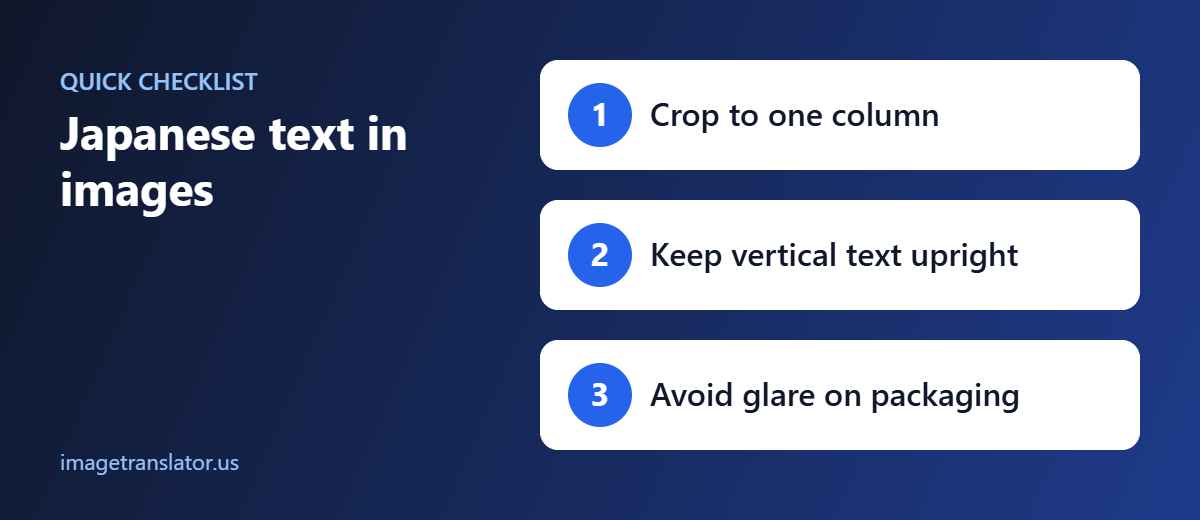
If the image contains a large amount of text, consider cropping it into smaller sections first.
For example, instead of uploading an entire restaurant menu, you could crop the food categories separately.
Step 3: Select English
Choose English as your target language.
Depending on the translation interface, the Japanese language may be detected automatically or selected as the source language.
Step 4: Let the Image Be Processed
The image translation system analyzes the Japanese characters and attempts to recognize the text.
The OCR process is especially important because translation quality depends partly on how accurately the original characters are recognized.
Step 5: Review the English Translation
Once the translation is generated, read the English result carefully.
Pay particular attention to:
- Names
- Numbers
- Prices
- Dates
- Measurements
- Addresses
- Product codes
- Technical terms
If something looks unusual, compare it with the original Japanese image.
Understanding Japanese Writing Systems
One reason Japanese image translation can be challenging is that Japanese commonly uses multiple writing systems.
Hiragana
Hiragana is frequently used for grammatical elements and native Japanese words.
Katakana
Katakana is commonly used for foreign words, loanwords, names, and certain types of emphasis.
Kanji
Kanji are Chinese-derived characters used extensively in Japanese writing.
A single image can contain all three systems at the same time.
For example, a Japanese restaurant menu may combine kanji with hiragana and katakana in the same sentence.
A good OCR system needs to recognize these different character types before translation can occur.
How to Translate Japanese Restaurant Menus
Japanese menus are one of the most useful applications for image translation.
When visiting Japan, you may encounter dishes written entirely in Japanese.
A menu could include information about:
- Sushi
- Ramen
- Tempura
- Rice dishes
- Noodles
- Seafood
- Desserts
- Drinks
- Set meals
Take a clear photograph of the menu and upload it to ImageTranslator.us.
If the menu contains small text, crop individual sections before translating.
Be Careful with Food Allergies
Translation can help you understand menu descriptions, but it should not be your only safety measure if you have a serious food allergy.
If an ingredient is medically important, confirm it directly with restaurant staff or another reliable source.
Machine translation may not always capture every ingredient or contextual detail correctly.
Translate Japanese Product Labels
Japanese products often include detailed information on their packaging.
You may want to translate:
- Ingredients
- Usage instructions
- Warnings
- Storage instructions
- Product specifications
- Manufacturing information
- Size information
This is particularly useful when purchasing Japanese cosmetics, electronics, food, household products, or other goods.
Take a clear photograph of the relevant section and translate it into English.
For safety-critical or technical information, verify important details before using the product.
How to Translate Japanese Screenshots
You can also translate Japanese text contained in screenshots.
For example, you might have a screenshot from:
- A Japanese website
- A mobile application
- Social media
- An online store
- A video
- A game
- A chat
- An online article
Instead of copying Japanese characters manually, save the screenshot and upload it to an image translation tool.
This can be particularly useful when the website or application doesn’t provide an English version.
How to Translate Japanese Street Signs
Travelers frequently encounter Japanese writing on:
- Street signs
- Train stations
- Subway stations
- Bus stops
- Buildings
- Tourist attractions
- Shopping areas
If you cannot read Japanese, take a photograph of the sign and translate it.
After translating the text, you can use the English result alongside a map or navigation application to identify the location.
For transportation or navigation, always confirm important information with official signs, announcements, or station staff.
How to Translate Japanese Train Station Signs
Japanese railway stations can contain a mixture of Japanese and English, but smaller signs may provide information only in Japanese.
You may need to understand:
- Station names
- Platform numbers
- Train destinations
- Exit numbers
- Transfer information
- Directional signs
- Ticket instructions
A photo translation tool can help you understand unfamiliar Japanese text.
However, train schedules and platform information can change. Always check the latest official display before boarding.
How to Translate Japanese Manga and Comics
Japanese manga often contains several types of text:
- Dialogue
- Narration
- Sound effects
- Character names
- Signs
- Notes
Image translation can help you understand visible Japanese text without manually typing each character.
For better results, crop individual panels or speech bubbles when necessary.
Manga Translation Can Be More Complex
Manga often uses stylized fonts, handwritten-looking characters, vertical text, and sound effects.
These features can make OCR more difficult.
If the translation doesn’t look right, try:
- Cropping the speech bubble.
- Using a higher-resolution image.
- Taking a clearer screenshot.
- Translating individual sections.
- Comparing the result with the original Japanese.
For published manga, respect copyright and use translated images responsibly.
Translating Vertical Japanese Text
Japanese can be written vertically as well as horizontally.
Vertical writing is particularly common in traditional publications, manga, books, advertisements, and some formal layouts.
If you encounter vertical Japanese text, make sure the image is clear and that the entire text area is visible.
If OCR struggles with a large page, crop the vertical text into smaller sections and process them separately.
How to Get Better Japanese Image Translation Results
Image quality has a major effect on OCR accuracy.
Use a High-Quality Image
Start with the clearest image available.
Avoid heavily compressed images whenever possible.
Avoid Blur
Hold your phone steady when photographing Japanese signs or documents.
Use Good Lighting
Make sure shadows and reflections don’t cover the characters.
Photograph Straight-On
Try to keep the camera parallel to the surface.
This is particularly important when photographing books, menus, or documents.
Crop the Text
If the image contains lots of unnecessary background, crop around the Japanese text.
This can make the characters easier to recognize.
Don’t Crop Too Aggressively
Make sure complete characters and words remain visible. Cutting off part of a character can make OCR less accurate.
What If the Japanese Translation Is Incorrect?
No automated image translation system is perfect.
Errors can happen when the image contains:
- Blurry text
- Decorative fonts
- Handwriting
- Tiny characters
- Low contrast
- Reflections
- Overlapping graphics
- Vertical text
- Stylized manga lettering
If the result doesn’t make sense, try a better image.
You can also crop the text into smaller sections and translate them separately.
For important information, have the translation checked by someone who understands Japanese.
Translating Japanese Names and Addresses
Names and addresses require special care.
A Japanese name may have several possible readings depending on the kanji used. An automated translation system may not always know the intended pronunciation or official English representation.
The same applies to company names, place names, and addresses.
If you’re translating a:
- Business card
- Shipping label
- Passport-related document
- Company document
- Official form
don’t automatically assume the generated English version is the person’s or organization’s official English name.
Verify important details independently.
Translate Japanese Documents Carefully
Image translation can be useful for getting the general meaning of Japanese documents, but important documents may require professional translation.
Examples include:
- Legal contracts
- Immigration documents
- Academic records
- Certificates
- Financial documents
- Medical documents
- Employment agreements
If a document will be submitted to a government agency, university, employer, court, or another organization, check its requirements first.
Some organizations may require certified or human translation rather than an automated translation.
Why Use ImageTranslator.us for Japanese Text?
Manually entering Japanese characters can be difficult if you don’t know the language or have access to a Japanese keyboard.
ImageTranslator.us provides an image-based way to approach the problem.
You can start with the Japanese image itself and use image translation to help understand text appearing in:
- Photos
- Screenshots
- Menus
- Signs
- Product packaging
- Documents
- Business cards
- Manga pages
This makes image translation particularly convenient when the Japanese text is already available as an image.
Japanese-to-English Image Translation Checklist
Before relying on the translation, check the following:
- Is the Japanese image clear?
- Is the text large enough to recognize?
- Is the photograph properly focused?
- Is there enough lighting?
- Is the text horizontal or vertical?
- Does the image contain kanji, hiragana, or katakana?
- Are names and numbers preserved correctly?
- Does the English translation make sense in context?
- Should the image be cropped and translated again?
- Does important information require human verification?
These simple checks can help you get more useful results.
Final Thoughts
Translating Japanese text in images to English can be much easier than manually typing unfamiliar characters. With OCR and AI-powered image translation, you can work directly from photographs, screenshots, menus, signs, product labels, documents, and other images.
Whether you’re traveling in Japan, shopping for Japanese products, reading manga, studying Japanese, or researching information online, ImageTranslator.us can provide a convenient way to understand visible Japanese text.
For everyday content, image translation can save time and make Japanese information much more accessible. For legal, medical, financial, immigration, safety-related, or other important documents, however, automated translation should be treated as a starting point and verified with a qualified translator or appropriate professional.
For the best results, use clear images, good lighting, sharp text, and carefully review important names, numbers, and technical information before relying on the translation.\
Further Reading
- Japanese writing system: how kanji, hiragana and katakana work together.
- Kanji: background on the Chinese characters used in Japanese.
