

How to Translate Arabic and Urdu Text in Images to English Without Right-to-Left Errors
You photograph a street sign in Dubai, a shop board in Lahore, or a page from an Arabic menu — and the English that comes back is scrambled. Words appear in the wrong order, letters come out separated like a broken typewriter, and a price that should read “25” shows up attached to the wrong dish. The photo is clear and the text is perfectly legible to a human reader. So what went wrong?
The answer is direction. Arabic and Urdu are written right to left, and their letters join together into a flowing script. Most image translators were built around left-to-right languages, so they make a particular set of mistakes with right-to-left (RTL) text — mistakes that look like gibberish but follow a pattern. This guide explains the five right-to-left errors that ruin Arabic and Urdu photo translations, and how to fix each one before you trust the result.
Try it now: our free Arabic and Urdu image translator reads the text in your photo and translates it to English in seconds, right in your browser. Upload your photo, select Arabic to English or Urdu to English, and check the result against the fixes below.
Why Arabic and Urdu Break Most Image Translators
Three features of the Arabic script cause nearly every error in this guide. First, the script runs right to left: the first letter of a word sits on the right, and the eye moves leftwards. Second, most letters join to their neighbours, so a word is one connected shape — the same letter looks different at the start, middle and end of a word. Third, several letters differ only by the number and position of dots above or below them, so a single missed dot changes the word entirely.
Urdu uses the same script with additions of its own. It adds letters Arabic does not have, such as ٹ (retroflex t), ڈ (retroflex d) and ڑ, and it is usually written in the Nastaliq style, where words slope diagonally downwards from right to left and letters stack more tightly than in the Naskh style used for most printed Arabic. A translator trained mainly on straight, horizontal Arabic print struggles with Nastaliq even when the photo is sharp.
The practical consequence is simple: with French or German photos, a bad translation usually still looks like English and you can guess what went wrong. With Arabic and Urdu, a bad translation often looks like nonsense, because the errors happen before translation even starts — at the reading stage. The fix is therefore mostly about helping the tool read the text correctly, then checking the English it produces.
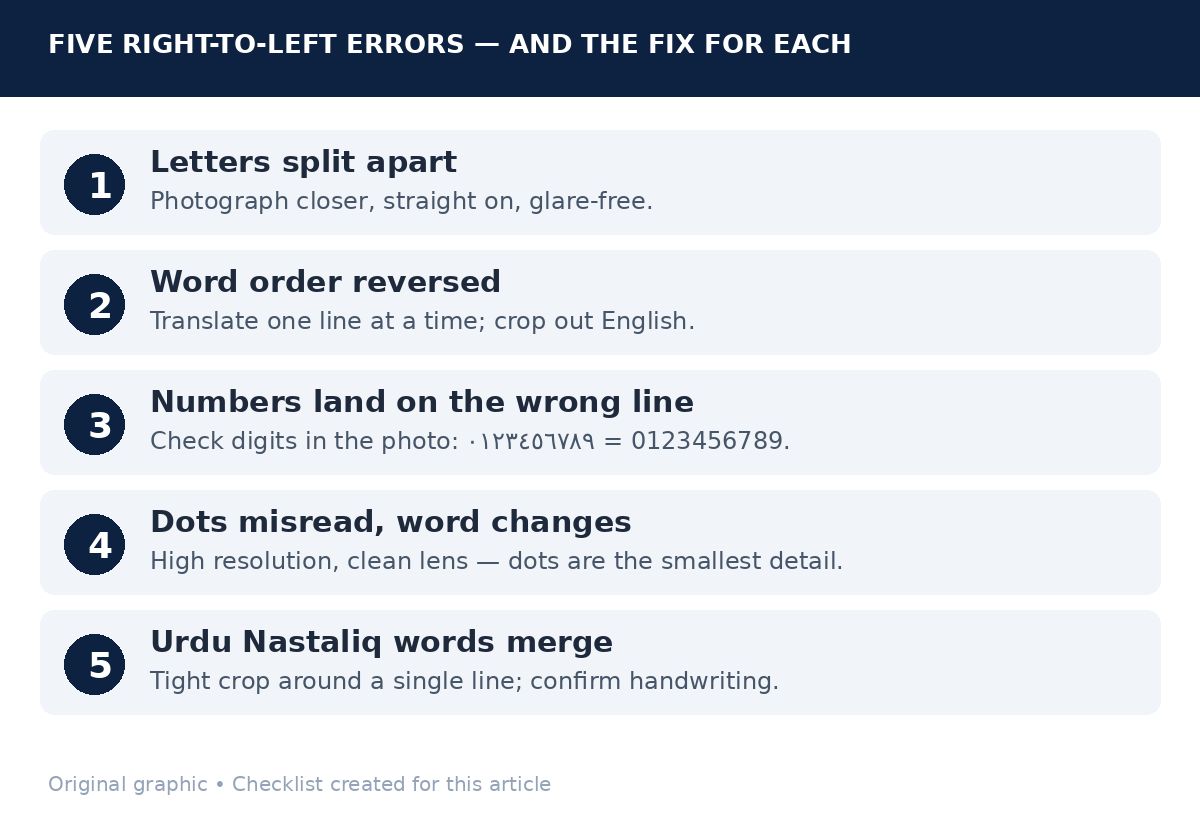
Error 1: Letters Come Out Split Apart
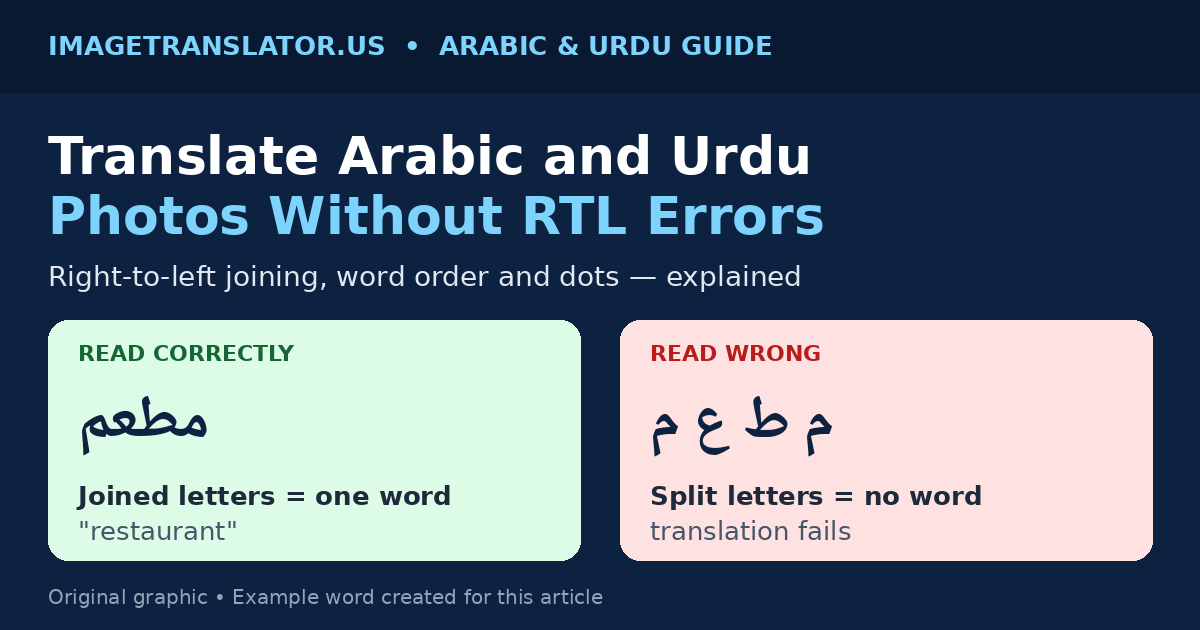
This is the most visible RTL error and the easiest to recognise. A word like مطعم (mat’am, “restaurant”) should be one connected shape. When the reading step fails, the tool returns the letters unjoined, in their isolated forms — something like م ط ع م — and the translation engine then has no real word to translate, so it guesses, skips the word, or returns the letters themselves.
Split letters usually mean the photo is the problem, not the language. The usual causes are low resolution, a photo taken at an angle so the letters lean, decorative fonts where the joins are thin, and glare across the middle of a word. A thin join between two letters is the first thing a reader loses when the image is blurry, and once the join is gone the word falls apart.
How to fix it: move closer and fill the frame with the text, so each word is as large as possible, and photograph signs straight on rather than at an angle. If the text is glossy, tilt the phone until the glare moves off the words. If one word still comes back split, crop to that word alone and translate it by itself.
Error 2: Word Order Comes Out Backwards
In an Arabic or Urdu sentence, the first word is on the right. A translator that reads the line left to right returns the words in reverse order, and the English describes the scene backwards. Short phrases often survive this — a two-word sign still makes sense either way — but a full sentence does not.
This error is worse when a line mixes scripts. A sign reading “مطعم السلام AL-SALAM RESTAURANT” contains both directions at once, and a weak reader can put the English words on the wrong side of the Arabic ones.
How to fix it: read the English result and ask whether the word order matches what the sentence should mean. If a sentence reads backwards, translate the photo again one line at a time — most tools handle a single line’s direction far better than a whole paragraph. For mixed-script signs, crop out the English part and translate the Arabic or Urdu alone; the English was already in English, and removing it takes the direction conflict away.
Error 3: Numbers, Prices and Dates Land in the Wrong Place
Numbers are the quiet troublemakers of RTL translation. Arabic text can use Western digits (0–9) or Eastern Arabic digits (٠١٢٣٤٥٦٧٨٩), and Urdu commonly uses Eastern Arabic digits. The digits themselves read left to right even inside a right-to-left sentence, so a price, a phone number or a date is a left-to-right island in a right-to-left river — and readers regularly attach it to the wrong word.
The classic failure is a menu or price list: the price 25 belongs to the dish on its line, but the translation puts it next to the dish above or below. Dates fail the same way, and currency symbols make it worse.
How to fix it: never trust a number’s position in a translated list — check it against the photo. Translate price lists one line at a time, and when a number matters — a price, a dosage, a date, a phone number — read the digits directly from the photo: Eastern Arabic digits ٠ ١ ٢ ٣ ٤ ٥ ٦ ٧ ٨ ٩ correspond to 0 1 2 3 4 5 6 7 8 9. For anything where a wrong number has real consequences — a bill, a medicine label, an official form — see our guide to translating medication labels safely, and get a human check.
Error 4: Dots Get Misread and Words Change Meaning
In the Arabic script, dots are not decoration — they are the letter. The shapes ب (b), ت (t), ث (th), ن (n) and ي (y) share the same basic curve and differ only in dots: one below, two above, three above, one above, two below. The same applies to ج ح خ and س ش. If the reader misses a dot, or invents one from a speck of dust, the word changes completely — and because the new word is still a real word, the translation looks confident while being wrong.
Diacritics — the small marks that indicate short vowels — cause a related problem. Most everyday Arabic and Urdu is written without them, which is fine for a human reader, but a tool can pick the wrong reading of an unvowelled word when two readings exist.
How to fix it: photograph the text at the highest resolution you can, because dots are the smallest detail in the image and the first to vanish, and wipe the camera lens — a smudge turns a dot into a blur. If a translated word looks wrong for its context (a food word in a street direction, for example), look at the dots in the photo: count them, check whether they sit above or below the line, and compare with the word you expected. Context is your best proofreader — a word that does not fit its sentence is usually a dot error, not a strange sentence.
Error 5: Urdu Nastaliq Slant and Joined Words Confuse the Reader
This error is specific to Urdu, and it is the reason Urdu photos fail more often than Arabic ones. Nastaliq, the style used for most Urdu printing and handwriting, slopes each word diagonally and stacks letters so tightly that neighbouring words can look joined. A reader built for the straight, level lines of Naskh Arabic can split one Urdu word into two, or merge two words into one — and once the word boundaries are wrong, the translation is wrong too.
Handwritten Urdu is harder still: letter shapes are simplified, and dots are sometimes written as a quick dash. A shopkeeper’s handwritten sign is genuinely harder to read than a printed one.
How to fix it: for printed Urdu, the usual photo fixes — closer, straighter, sharper — solve most cases. For handwritten Urdu, translate one short line at a time and keep the crop tight around that line, so the slope of one line does not confuse the reader about where the next begins. If a word keeps failing, ask a speaker to confirm the reading; some handwriting is simply ambiguous. Our guide to translating Thai text in images covers a similar problem — a script with its own spacing and shape traps — and the same line-by-line approach applies.
How to Photograph Arabic and Urdu Text So It Reads Correctly
Most RTL errors are photo errors first and translation errors second. A few habits remove the majority of them:
- Fill the frame. The text should take up most of the photo. Small text in a wide shot is the single biggest cause of split letters and lost dots.
- Shoot straight on. Perspective distortion leans the letters and breaks the joins. Stand directly in front of the sign or hold the page flat.
- Use good light, not flash. Daylight or a steady lamp beats a camera flash, which creates a bright spot that wipes out dots and joins.
- Keep lines level and separate. Photograph a paragraph in overlapping sections of two or three lines rather than the whole block at once.
- One script per photo where possible. If a sign mixes Arabic and English, crop to the Arabic or Urdu part for the translation pass and read the English directly.
These habits fix most translation failures in any language — see our guide to 9 OCR mistakes and how to fix each one — but they matter more for Arabic and Urdu, where the script punishes small reading errors with completely different words.
Step by Step: Translate an Arabic or Urdu Photo to English
- Take a clean photo using the habits above: close, straight, well lit, two or three lines at most.
- Open the Arabic and Urdu image translator and upload the photo — processing happens in your browser, so the image is never uploaded to a server. (See our guide on whether image translators are safe.)
- Select Arabic to English or Urdu to English as the language pair before translating. Choosing the right source language matters: the two languages share a script but have different vocabularies, and the wrong choice produces confident nonsense.
- Translate one section at a time for anything longer than a sign. Short passes keep word order and numbers in place.
- Check the result against the five errors above — split letters, reversed order, misplaced numbers, dot mistakes, Nastaliq merging — and re-translate any line that looks wrong as a tighter crop.
How to Check a Translation Before You Trust It
A translation you cannot read in the original needs a verification habit. Three quick checks catch most remaining errors. Read it back for sense: does the English mean something a person would actually say here? A restaurant sign that translates to something about a hospital is a dot error, not a strange restaurant. Check the load-bearing words: the dish name, the street name, the number on a price — verify those specifically, translating a single word on its own, rather than re-reading the whole passage. Translate it back: take the English result and translate it back to Arabic or Urdu, then compare it with the photo. A big change in meaning is a reliable warning.
Where a mistake has real consequences — directions you will follow alone, a medical instruction, a legal document — a photo translation is a first draft, not a final answer. Confirm it with a speaker of the language, or a certified translation if the document is official.
Arabic vs Urdu: What Changes When You Switch Languages
| Arabic | Urdu | |
|---|---|---|
| Script style | Usually Naskh — level, horizontal lines | Usually Nastaliq — sloping, stacked words |
| Extra letters | 28-letter alphabet | Adds ٹ ڈ ڑ ں ے and others Arabic lacks |
| Common digits | Western (0–9) or Eastern Arabic (٠–٩) | Usually Eastern Arabic (٠–٩) |
| Hardest photos | Decorative calligraphy, angled signs | Handwritten signs, dense Nastaliq print |
| Typical error | Dot confusion, reversed word order | Word boundaries merging or splitting |
| Fix that helps most | High resolution, straight-on photo | One line at a time, tight crop |
Both languages reward the same habits — close, straight, well-lit photos and line-by-line translation — but Urdu needs the extra step of isolating single lines, because Nastaliq’s slope breaks word boundaries. Set the source language explicitly each time; auto-detect can pick the wrong one, since the scripts overlap so heavily.
Frequently Asked Questions
Why does my Arabic photo translation come out backwards?
Because Arabic reads right to left and the tool read the line left to right, reversing the word order. Translate one line at a time and crop out any English text on the same sign.
Can an image translator handle handwritten Urdu?
Printed Urdu usually translates well with a clean photo. Handwritten Urdu is harder, especially in Nastaliq, because letter shapes vary and dots are simplified. Translate one short line at a time, and treat the result as a draft to confirm with a speaker.
Why did one wrong dot change the whole translation?
Several letters share one shape and differ only by dots — ب ت ث ن ي are the same curve with different dots. If the reader misses or invents a dot, the word becomes a different real word, and the translation follows it confidently. High-resolution, well-lit photos protect the dots.
Should I choose Arabic or Urdu as the source language?
Choose the language the text is actually written in. The scripts overlap, but the vocabularies differ, and picking the wrong one produces fluent-looking nonsense. If you are unsure, look for Urdu-only letters such as ٹ ڈ ڑ.
Right-to-left text is not harder to translate than any other script — it just fails in its own specific ways, and those ways are predictable. Photograph the text close, straight and well lit, translate it a few lines at a time with the correct source language selected, and check the result for split letters, reversed order, wandering numbers and dot errors. Try it with your own photo on our free Arabic and Urdu to English image translator.
