

How to Translate Thai Text in Images to English — Tones, No Spaces and Street Signs Explained
Thai looks like no other language you have tried to translate from a photo. There are no spaces between words, the same syllable can mean three different things depending on its tone, and the letters loop and curl in ways that make even a sharp photo hard for a computer to read. Yet Thai is one of the most useful languages to translate from images: street signs, night-market menus, temple notices, medicine packets and songthaew route boards are all in Thai first, and English second — if at all. This guide explains how to translate Thai text in images to English, why Thai trips up image translators, and how to get a result you can trust.
Try it now: upload your photo to our free Thai to English image translator — select Thai as the source language and English as the target, and translate a Thai photo to English in seconds, with no account needed.
Why Thai Is Harder to Translate From a Photo Than Most Languages
Three features of written Thai cause almost every mistake an image translator makes. Understanding them tells you what to check in every result.
1. There are no spaces between words
Thai does not put spaces between words. Spaces mark the end of a sentence or a clause, not the boundary between one word and the next. A Thai sentence looks like one long ribbon of characters, and the reader — human or machine — has to work out where one word ends and the next begins.
For example, this everyday sentence is written with no gaps at all:
Thai: ห้องน้ำอยู่ตรงไหน
Word by word: ห้องน้ำ (toilet) อยู่ (is) ตรงไหน (where)
English: “Where is the toilet?”
An OCR engine that is used to English, where spaces do the splitting for free, has to guess the word boundaries in Thai. Usually it manages. But when a sign uses an unusual word, a brand name, or a word split across two lines, the guess can go wrong — and a wrong word boundary means a wrong translation. Short, common phrases survive this well; long, dense paragraphs are where errors creep in.
2. Tones change the meaning — and the translator cannot hear them
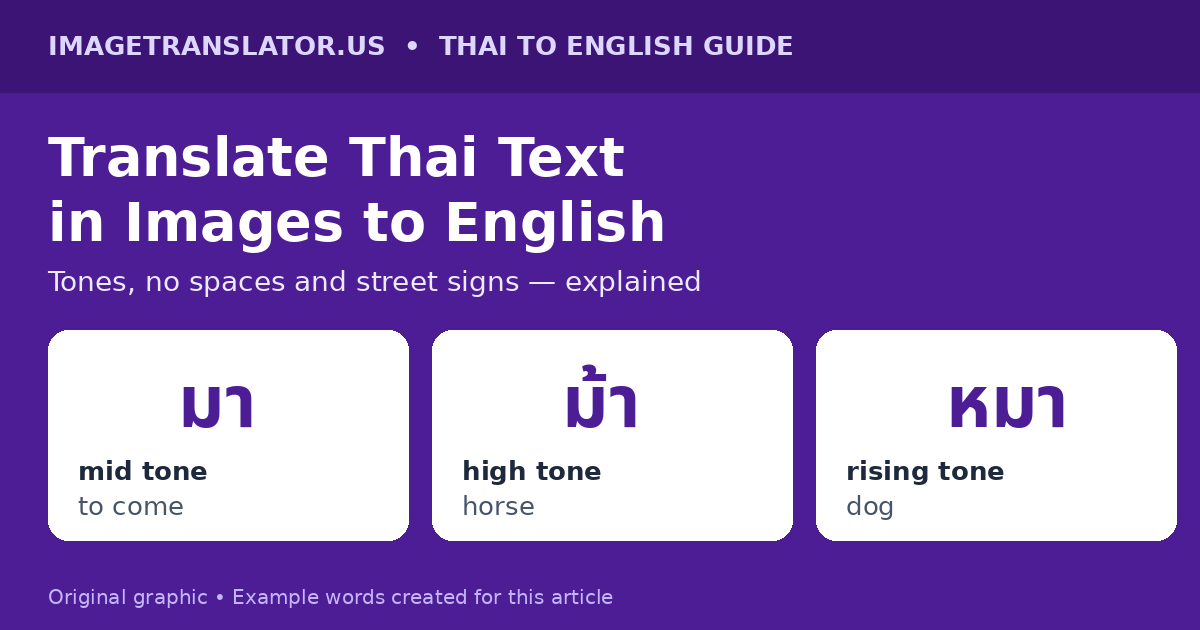
Thai is a tonal language with five tones: mid, low, falling, high and rising. The same syllable, written with the same consonant and vowel but a different tone mark, can be a completely different word. The classic example uses the syllable “ma”:
| Thai | Tone | Meaning |
|---|---|---|
| มา | Mid | to come |
| ม้า | High | horse |
| หมา | Rising | dog |
In speech, your ear hears the tone. In a photo, the tone is a small mark sitting above the consonant — and it is the first thing a blurry or low-resolution photo loses. If the OCR engine misses a tone mark, “dog” can become “horse”, and a sentence about a lost dog turns into nonsense. The good news is that context usually saves the translation: a sign outside a stable that mentions ม้า is about horses, whatever the tone mark looks like. The bad news is that on short signs with little context — a single word on a door, for instance — a missed tone mark can flip the meaning entirely, and there is nothing in the sentence to correct it.
3. The script packs vowels and tone marks around the consonant
For a camera, that density is the problem. Tilt the phone slightly, photograph a sign from an angle, or let a shadow fall across it, and the marks above the line merge with the line below. Our guide to why image translations come out wrong covers the usual culprits — blur, glare, angle and small text — and every one of them matters more in Thai than in English, because the marks that carry meaning are the smallest parts of the letters.
How to Translate Thai Text From a Photo, Step by Step
Follow these steps and most Thai photos translate cleanly on the first attempt.
- Photograph straight on, and fill the frame. Stand directly in front of the sign or menu, hold the phone parallel to it, and get close enough that the text fills the screen. Thai tone marks are tiny; distance is their enemy.
- Photograph one section at a time. A whole restaurant menu in one shot gives the translator small, crowded text. Photograph each section — starters, mains, drinks — separately, and translate them one by one.
- Check the light. Glossy laminated menus and plastic signs reflect light straight into the lens. Tilt the phone slightly or step to the side until the glare moves off the text, then shoot. Shade is better than direct sun for outdoor signs.
- Upload it to the Thai to English image translator. Select Thai as the source language and English as the target, then upload your photo. The tool reads the Thai text in your browser and translates it in seconds.
- Read the result against the situation. Does the translation fit what you are looking at? A dish on a menu should sound like food; a sign on a door should sound like an instruction. If a line reads like nonsense, a word boundary or a tone mark was probably misread — re-photograph that line on its own, closer and straighter.
- Double-check numbers, prices and names. Thai numerals (๐๑๒๓๔๕๖๗๘๙) appear on older signs and official notices, though most modern signs use the same Arabic numerals as English (0123456789). Either way, verify prices and quantities against the photo yourself before you pay or order — machine translation is good at meaning and bad at digits.
Reading Thai Street Signs: What to Expect
Bangkok’s main road signs are usually bilingual — Thai in large letters, with an English translation underneath in smaller ones. That is genuinely helpful, and it also gives you a free accuracy check: translate the Thai yourself, then compare with the printed English.
But the signs that matter most to a traveller are often Thai-only. The ones worth learning to recognise are:
| Thai | Pronunciation | English | Where you will see it |
|---|---|---|---|
| ทางออก | thaang-ɔ̀ɔk | Exit / way out | Stations, malls, car parks |
| ห้ามเข้า | hâam-khâo | No entry | One-way streets, restricted areas |
| ห้องน้ำ | hɔ̂ng-náam | Toilet / restroom | Everywhere — the most useful sign in Thailand |
| เปิด | pə̀ət | Open | Shop doors and shutters |
| ปิด | pìt | Closed | Shop doors and shutters |
| ห้ามจอดรถ | hâam-jɔ̀ɔt-rót | No parking | Kerbs and driveways |
| ระวัง | rá-wang | Caution / beware | Roadworks, wet floors, dogs |
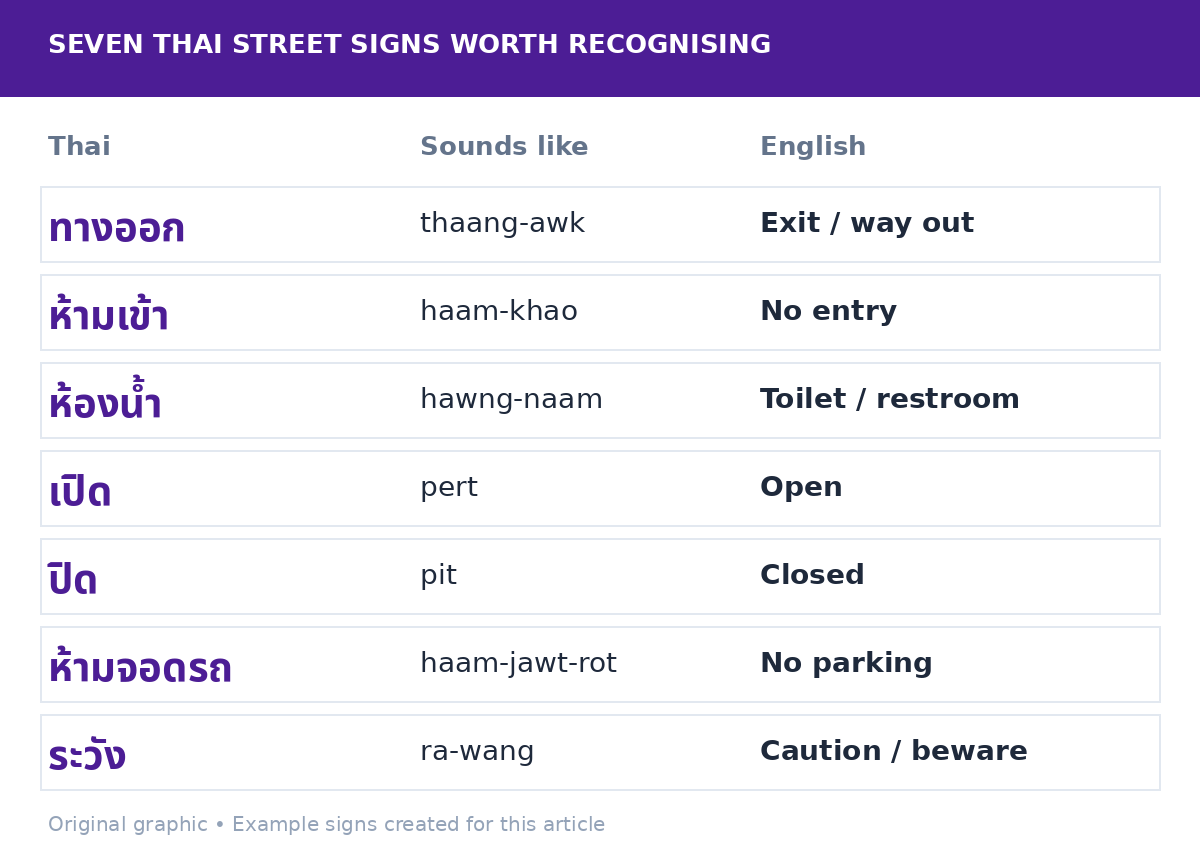
These are short, high-frequency words — exactly the kind of text an image translator handles best, because there is little room for a word-boundary error. Photograph the sign, translate it, and if the result is one of the words below, you can trust it. The signs that need a second look are the long ones: a temple notice, a set of park rules, a warning with three lines of small text. For those, photograph each line separately and translate line by line.
Translating a Thai Menu From a Photo
Thai menus are the most common thing visitors photograph, and the most rewarding to get right — the difference between ordering grilled chicken and something you did not expect is one word. A few menu words appear so often that learning them pays off immediately, and they also help you sanity-check the translation:
| Thai | English | Notes |
|---|---|---|
| ข้าว | rice | The base of most dishes; ข้าวผัด is fried rice |
| ไก่ | chicken | Also appears in ไก่ย่าง (grilled chicken) |
| หมู | pork | Not to be confused with หมา (dog) — the tone mark matters |
| ผัด | stir-fried | ผัดไทย is pad thai |
| ต้ม | boiled / soup | ต้มยำ is tom yum soup |
| เผ็ด | spicy / hot | เผ็ดมาก means very spicy — take it seriously |
| ไม่เผ็ด | not spicy | The phrase to learn if you cannot handle chilli |
Two menu traps are worth knowing. First, dish names are often written as one long unspaced block — ข้าวผัดไก่ (fried rice with chicken) is three words with no gaps — so a translation that splits the block in the wrong place can turn one dish into two. If a menu line translates as something that does not sound like food, re-photograph it closer. Second, prices are sometimes written in Thai numerals on handwritten or older menus, so check the numbers against the photo rather than trusting the translated digits.
For the general technique, our guide to translating a foreign restaurant menu with your phone camera covers lighting, angles and what to double-check before you order.
A Worked Example: One Sign, Translated Line by Line
Here is a short, realistic example we wrote ourselves — the kind of notice you might find taped to a shop door in Bangkok. First, the Thai as you would see it:
Thai: ร้านเปิดทุกวัน 9 โมงเช้า ถึง 6 โมงเย็น หยุดวันจันทร์
Word by word: ร้าน (shop) เปิด (open) ทุกวัน (every day) 9 โมงเช้า (9 in the morning) ถึง (until) 6 โมงเย็น (6 in the evening) หยุด (closed) วันจันทร์ (Monday)
English: “The shop is open every day from 9 in the morning until 6 in the evening. Closed on Mondays.”
Notice two things. First, the whole notice is a single unspaced run of characters — the only gap is where the sentence changes idea. Second, the numbers are written in Arabic numerals (9 and 6), as on most modern Thai signs, so the times survive translation easily.
Common Mistakes When Translating Thai Photos
- Photographing the whole menu or notice board at once. Small Thai text defeats OCR because the tone marks vanish first. Crop to one section and move closer.
- Trusting a single-word translation without context. A one-word sign has no surrounding sentence to correct a misread tone mark. If the result seems odd for the situation — a “horse” where you expected a door — it is probably a misread, not a mystery.
- Photographing a screen instead of using the screenshot. A photo of a phone showing Thai text adds glare and moiré, which blur exactly the small marks that matter. Save the original screenshot and upload that instead. The same advice applies to any script with small distinguishing marks — see how it plays out with Chinese in our guide to Simplified vs Traditional Chinese in photos.
- Ignoring line breaks. Thai signs sometimes break a word across two lines, which is invisible to an English reader used to hyphens. If a translation comes back half-finished, translate each line separately and join the sense yourself.
- Using a Thai translation for medicine or legal papers without a check. Dosage instructions, allergy warnings and official forms deserve a second look from a human, ideally a pharmacist or a certified translator. A mistranslated tone mark on a medicine label matters more than one on a menu.
Frequently Asked Questions
Can an image translator read Thai text?
Yes. Modern OCR reads the Thai script well in a clear, straight-on photo, and machine translation from Thai to English is good for everyday text such as signs, menus and notices. Accuracy drops on small, blurry or angled photos, because the small tone marks above the letters are the first thing to disappear — so photograph Thai text closer than you would English text.
Why does my Thai translation come out wrong?
The most common causes are a missed tone mark, a wrong word boundary (Thai has no spaces between words), or a photo that is too small, blurry or angled. Re-photograph the line on its own, closer and straighter, and translate it again. If one line still reads as nonsense, translate it word by word using the common words in the tables above.
How do I translate a Thai menu to English?
Photograph one section of the menu at a time, close and straight on, with no glare on the laminated surface. Upload each photo to a Thai to English image translator, select Thai as the source and English as the target, and check the dish names against the situation — a result that sounds like food is probably right. Double-check prices and spice levels (เผ็ด means spicy) before you order.
Does Thai use spaces between words?
No. Thai writing puts no spaces between words; spaces mark the end of a sentence or clause. That is why Thai text looks like one continuous ribbon, and why image translators sometimes split words in the wrong place. Longer sentences with more context translate more reliably than single words.
Thai rewards the photographer more than the translator: get close, shoot straight, crop to the text you need, and translate one section at a time. Do that, and a language with no spaces and five tones turns out to be very translatable indeed — one street sign, one market menu, one temple notice at a time.
