

How to Translate Ukrainian Text in Images to English: Cyrillic, Signs and Documents Explained
You are standing in front of a blue sign in Lviv that says “ВИХІД”, or holding a menu in Kyiv and trying to work out whether “вареники” is something you want for lunch. The letters look familiar — some of them are the same shapes as English letters — but the words they spell are not English at all. You point your phone at the sign, and the translation that comes back is close, but one letter is wrong, and that one letter changes the whole word. The photo is sharp and the text is clear. So why does Ukrainian trip up image translators more than most languages?
The answer is that Ukrainian is written in Cyrillic, and Cyrillic is full of letters that look like Latin letters but sound completely different — and Ukrainian has four letters that Russian does not, which is exactly where most translators go wrong. Treat Ukrainian as Russian and you will get the alphabet wrong on the words that matter most. This guide explains how Ukrainian works in photos, the mistakes it causes in translation, and how to translate Ukrainian text in images to English reliably — from street signs and menus to screenshots and official documents.
Try it now: our free Ukrainian to English image translator reads the text in your photo and translates it to English in seconds, right in your browser. Open the homepage, upload your photo, select Ukrainian as the source language and English as the target, and check the result against the fixes below. (There is no separate pre-selected Ukrainian tool page on this site — the homepage tool handles the pair.)
Ukrainian Looks Like Russian — Until It Doesn’t
Ukrainian uses the Cyrillic alphabet, 33 letters, and shares most of them with Russian. That overlap is the trap: a translator that guesses “Russian” for a Ukrainian photo will read most of the text correctly and get the distinctive letters wrong — and the distinctive letters are often the ones carrying the meaning. Ukrainian has four letters Russian does not have: І (sounds like “ee”), Ї (“yee”, with two dots), Є (“yeh”), and Ґ (a hard “g”). It also has no Ы, Ъ or Э, the letters Russian uses. If your photo shows І, Ї, Є or Ґ, the text is Ukrainian — and if the tool reads them as Russian letters, the translation will drift.
The most common single-letter mistake is И. In Ukrainian, И sounds like the “i” in “bit” — but in Russian, the same shape И sounds like “ee”. The letter that sounds like “ee” in Ukrainian is І, which looks like a backwards N. So the Ukrainian word “місто” (city) and the Russian word “место” (place) look similar and mean different things, and a translator working in the wrong language will swap them. The fix is simple: always set Ukrainian as the source language explicitly, never rely on auto-detection for a short sign or a single word.
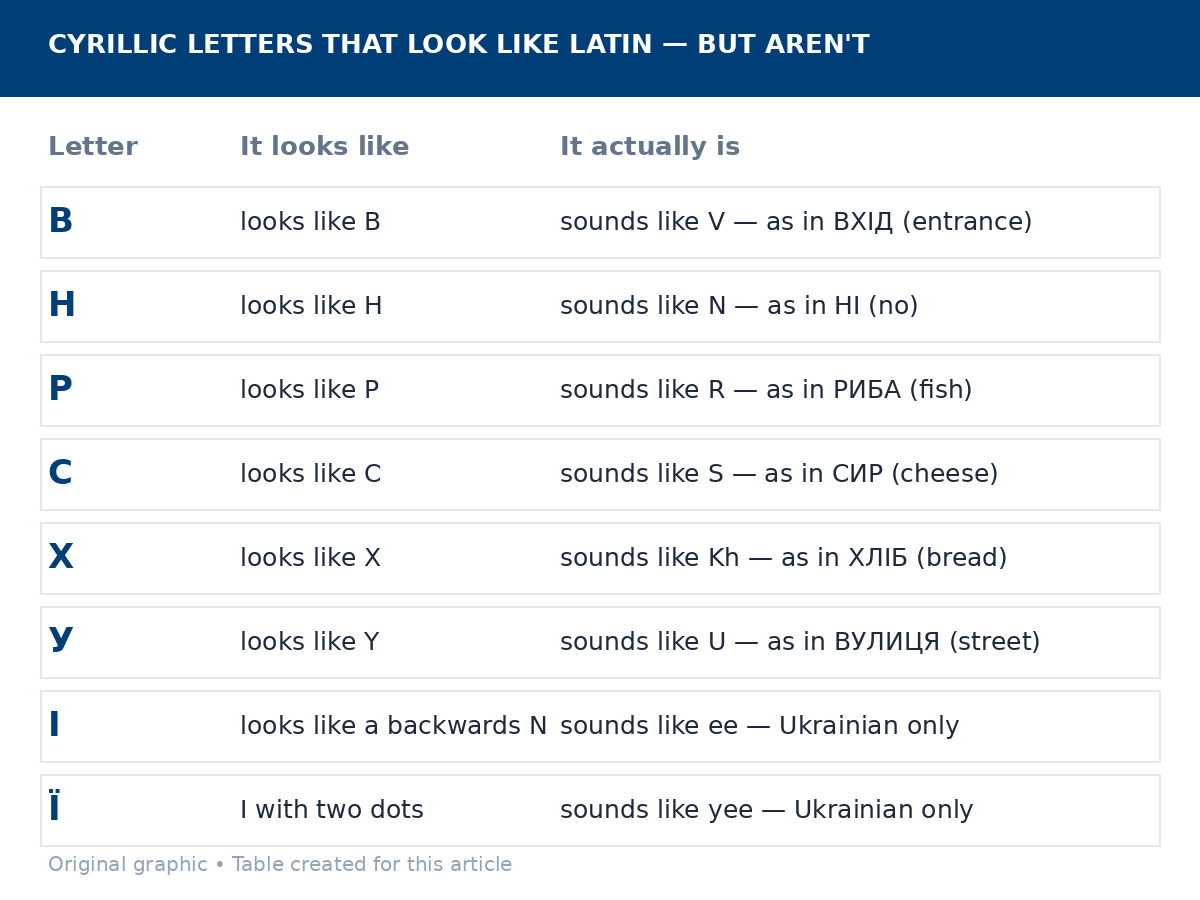
Then there are the lookalikes — Cyrillic letters shaped exactly like Latin ones but pronounced differently. В is V, not B. Н is N, not H. Р is R, not P. С is S, not C. Х is Kh, not X. У is U, not Y. Т is T, and П is P even though it looks like a small “n”. Read “СТОП” as “STOP” and you are fine; read it letter by letter as Latin and you get “CTON”. A good photo translator handles this automatically once the language is set — but when it doesn’t, the lookalikes are the first place to check the detected text. Our guide to translating Russian text in photos to English covers the same lookalike problem from the Russian side, and the fix is identical: compare the detected text against the photo letter by letter.
Two more Ukrainian details worth knowing. First, the apostrophe is part of the spelling: “м’ясо” (meat) and “з’їсти” (to eat) carry an apostrophe that separates two sounds, and a translator that drops it can misread the word. Second, Ukrainian uses the letter Ґ in words like “ґанок” (porch) and “ґудзик” (button) — if your photo shows Ґ and the tool turns it into Г (which sounds like “h” in Ukrainian), the word changes. When a single word comes back wrong, look at exactly these letters first.
Street Signs: Short Text, High Stakes
Ukrainian street signs are short — usually two to four words — which makes them both easy and dangerous to translate. Easy, because there is little text to misread; dangerous, because a single wrong word changes an instruction. The signs travellers meet most often are worth knowing in advance:
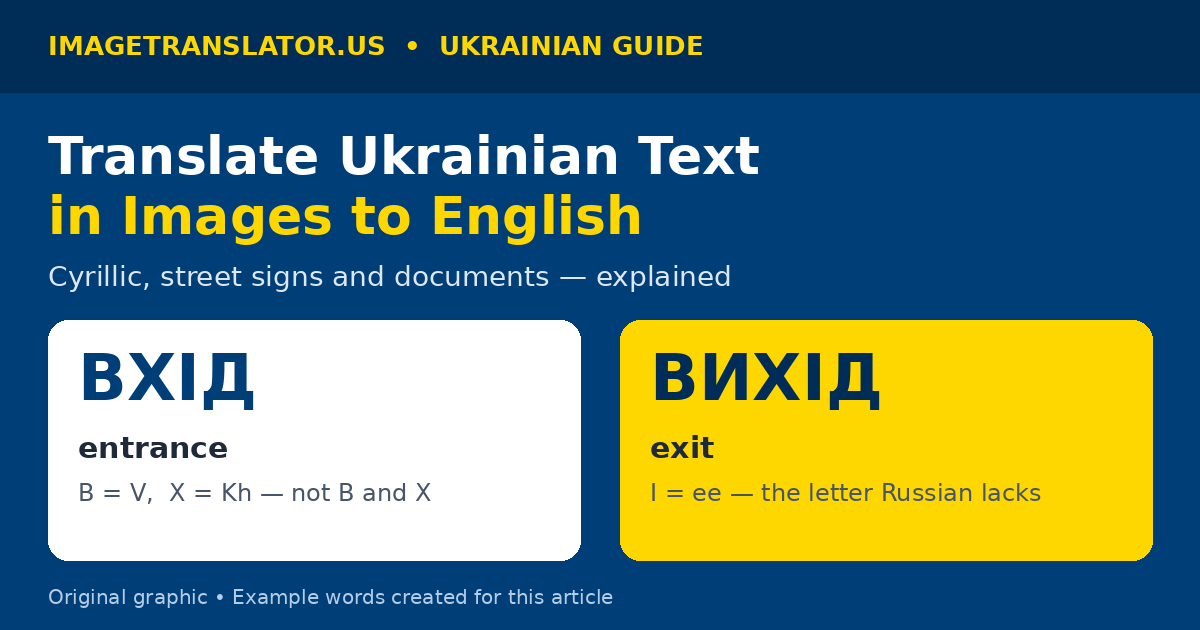
- ВХІД — entrance. ВИХІД — exit. The two words differ by two letters and mean the opposite — check which one the photo actually says before you walk through the door.
- СТОП — stop.
- НЕ КУРИТИ — no smoking. ЗАБОРОНЕНО — forbidden or prohibited.
- ВУЛИЦЯ — street. “Вул.” on a sign is the abbreviation for “вулиця”.
- ОБЕРЕЖНО — caution or be careful.
- ВІДЧИНЕНО — open. ЗАЧИНЕНО — closed.
- АПТЕКА — pharmacy. ЛІКАРНЯ — hospital. ПОЛІЦІЯ — police.
- ВОКЗАЛ — station. ЗУПИНКА — bus or tram stop. ПЕРЕХІД — crossing.
- КАСА — ticket office or cashier. ТУАЛЕТ — toilet.
Watch out for compounds and abbreviations on signs. “Залізничний вокзал” is a railway station; “автовокзал” is a bus station. “Робочі години” means working hours. If a sign controls where you can drive, park or enter and the translation is uncertain, take the safer reading: if it might say “no entry”, do not enter. For safety-critical text of any kind, see our guide to reading medicine labels, warning signs and official forms in another language — the same “verify before you act” rule applies.
Menus and Food: Dish Names Are the Hard Part
Menus are where Ukrainian translation errors have the most entertaining consequences. The words for food are specific, and a missed letter turns one dish into another: “борщ” is borscht, the beet soup; “вареники” are filled dumplings; “голубці” are stuffed cabbage rolls; “сало” is cured pork fat; “деруни” are potato pancakes. Order from a mistranslation and you may get the wrong dish entirely, which is harmless at a restaurant but a real problem if you have an allergy.
Common menu words worth recognising before you translate:
- Борщ — borscht (beet soup). Вареники — dumplings, usually filled with potato, cheese or cherries.
- Голубці — stuffed cabbage rolls. Сало — cured pork fat, served with bread.
- Деруни — potato pancakes. Котлета — cutlet or patty.
- Суп — soup. Салат — salad. Десерт — dessert.
- М’ясо — meat. Риба — fish. Сир — cheese. Хліб — bread.
- Кава — coffee. Чай — tea. Пиво — beer. Вода — water. Сік — juice. Молоко — milk.
- Ціна — price. Меню — menu. Гарнір — side dish.
Menus also mix Ukrainian with prices in hryvnia, and the numbers matter: “250 грн” means 250 hryvnia, and the “₴” symbol is the hryvnia sign. A translator that treats the price as a separate line can attach it to the wrong dish — the most common menu error is a price drifting onto the line above or below. Translate one section at a time, and check prices against the photo directly. Our guide to translating a restaurant menu from a photo has the full traveller’s checklist — photograph the menu section by section, and double-check allergens before you order.
Try it on a menu: open the Ukrainian to English image translator, upload a photo of the menu, select Ukrainian to English, and translate one section at a time rather than the whole page. Section-by-section translation keeps dish names attached to their prices.
Documents and Official Paper: Read It Twice
Ukrainian documents turn up in photos more often than most languages do — identity cards, birth certificates, diplomas, property papers and medical records. The words on them are formal and abbreviated, and the stakes are higher than a menu: a misread date, name or number on a document can cause real problems.
Common document words: “паспорт” (passport), “свідоцтво про народження” (birth certificate), “диплом” (diploma), “посвідчення” (identity card or certificate), “довідка” (certificate or reference letter), “прізвище” (surname), “ім’я” (first name), “дата народження” (date of birth). Ukrainian dates are written day-month-year, so 03.04.2026 is 3 April, not 4 March — a translator will not fix that for you, and it is the easiest mistake to make on a document photo.
Two rules for documents. First, photograph them flat, straight on, and in good light — curved or angled document photos are the single biggest cause of misread names and numbers. Second, treat any machine translation of an official document as a first read, never a final one. For immigration, legal or medical use, the document needs a certified translation by a qualified human translator; an image translator tells you what the document says, it does not make it official. If the document is a medicine label or a warning, read our guide to reading medicine labels and official forms before you act on what it says.
A Step-by-Step Method for Ukrainian Photos
Put the fixes in this guide together and a reliable routine emerges:
- Set Ukrainian as the source language. Never rely on auto-detection — it is the single biggest cause of Ukrainian being read as Russian, and the four Ukrainian-only letters are the first casualties.
- Photograph it well. Get close, shoot straight on, avoid glare. Small letters — especially І, Ї and the apostrophe — are the first thing a reader drops from a poor photo.
- Read the Ukrainian the tool detected, not just the English. Compare the detected text against the photo, especially the letters І, Ї, Є and Ґ, and the lookalikes В, Н, Р, С, Х and У.
- Translate whole phrases, not single words. Signs and dish names only make sense in context — “вихід” is an exit, not a word to guess at letter by letter.
- Re-crop and retry the words that fail. One line at a time, larger and sharper, fixes most persistent errors — especially on menus, where a price can drift onto the wrong line.
- Sanity-check the English against the situation. A sign on a station platform, a dish on a menu, a price in hryvnia — if the English does not fit where you are standing, a lookalike letter or a wrong-language guess is probably the culprit.
- Verify anything that matters. Allergens, prices, directions, safety warnings and official text deserve a second check — from a speaker, or from a second translation of a clean re-photograph.
Frequently Asked Questions
Can I translate Ukrainian text in images to English for free?
Yes. Upload your photo to a free image translator, select Ukrainian as the source language and English as the target, and the translation runs in your browser. On this site, open the homepage tool, choose Ukrainian to English, and upload your image — no account is needed.
Why does my translator keep reading Ukrainian as Russian?
Because the two languages share most of the Cyrillic alphabet, auto-detection guesses Russian more often — it is the larger language. Set Ukrainian explicitly as the source language, and check that the four Ukrainian-only letters (І, Ї, Є, Ґ) were detected correctly. If they were not, the language was guessed wrong.
What does “ВИХІД” mean?
It means “exit”. Its opposite is “ВХІД”, entrance. The two words look alike and mean the opposite, so check which one your photo actually says before you follow it.
Can an image translator read handwritten Ukrainian?
Partly. Printed Ukrainian translates well, but handwritten Cyrillic — especially cursive, where letters join and change shape — is much harder for OCR to read. Photograph handwriting flat and straight on, in good light, and expect to correct a few letters by hand.
Is there a Ukrainian to English image translator for documents?
Yes — any image translator that supports Ukrainian can translate a document photo, but a machine translation is only a first read. For immigration, legal or medical use, the document needs a certified translation by a qualified human translator.
Do I need a separate Ukrainian translator app?
Not for occasional use. A browser-based image translator handles photos, menus, signs and screenshots without installing anything, and because this site processes images in your browser, your photo is never uploaded to a server. For heavy daily use or offline translation, a dedicated app may be more convenient — but for a menu or a street sign, the browser tool is enough.
Ukrainian rewards one habit above all others: set the language yourself. Do that, check the four letters Russian doesn’t have, and translate whole phrases instead of single words — and the same phone that read your first street sign will read the next one correctly.
